当你看到Discord机器人实际运行时,它们可能看起来异常复杂。机器人可以回复消息、讲故事、记住对话的部分内容,并且全天候保持在线。
当我最初开始研究它们的工作原理时,我原以为这一切背后一定涉及大量复杂的代码。
但实际上,其基本思想相当简单。
从本质上讲,Discord机器人只是一个Python程序,它连接到Discord,等待某些事件发生,然后决定如何响应。一旦你理解了这一基本思想,就可以一次添加一个功能,将简单的机器人变成更有趣的东西。
在本教程中,我们将从一个非常小的机器人开始,逐步把它构建成功能更强大的东西。在此过程中,你将学习Discord命令、事件、异步Python、用户状态、环境变量和基本部署。
开始之前有一个简短的免责声明:我们将在这个项目的机器人中集成的心理健康功能不是治疗,机器人也不是治疗师或医疗专业人员。它只应提供一般性的支持性建议,并鼓励用户在适当的时候联系值得信赖的人。
废话不多说,让我们开始编写代码吧!
我们将涵盖的内容:
我们要构建什么
我们完成的机器人将会有几个命令:
!hello
!story
!chat hello!
!support I'm having a stressful day
!help
例如:
User:
!story

Bot:
You wake up inside an abandoned library.

There are three doors in front of you:

1. A red wooden door
2. A metal door covered in strange symbols
3. A staircase leading underground

Which one do you choose?
然后用户可以继续这个故事。
对于聊天:
User:
!chat What's a good way to learn Python?

Bot:
Try building small projects instead of only reading tutorials.
A Discord bot is actually a pretty fun project to start with.
以及为了心理健康支持:
User:
!support I'm really stressed about school.

Bot:
That sounds like a lot to deal with. You could try breaking
the work into one small task at a time and taking a short
break between tasks.

I'm a bot, not a therapist, so if you need personal support,
consider talking with someone you trust.
目标不是要制作一个神奇的机器人治疗师。而是在学习Discord API、Python函数、事件、异步编程和基本对话逻辑如何组合在一起的同时,构建一个有用的机器人。
你需要什么
你只需要几样东西:
Python(推荐使用3.8+版本)
一个Discord账户
一个你有权限添加机器人的Discord服务器
一个代码编辑器(我个人更喜欢VS Code或PyCharm)
这个
discord.py库
我们还会使用Python内置的os模块来读取环境变量。
如果你还没有安装Python,请从Python官方网站安装当前受支持的Python版本。
然后检查Python是否正常工作:
python --version
您应该看到类似的内容:
Python 3.x.x
创建Discord机器人
在Python控制Discord之前,我们需要创建一个Discord应用程序。
前往Discord开发者门户:https://discord.com/developers/applications

这就是页面的样子,你需要在开始之前使用你的Discord邮箱/用户名和密码登录。
点击右上角的“New Application”按钮,为你的机器人取一个名字。在本教程中,我们将其命名为StoryBot。
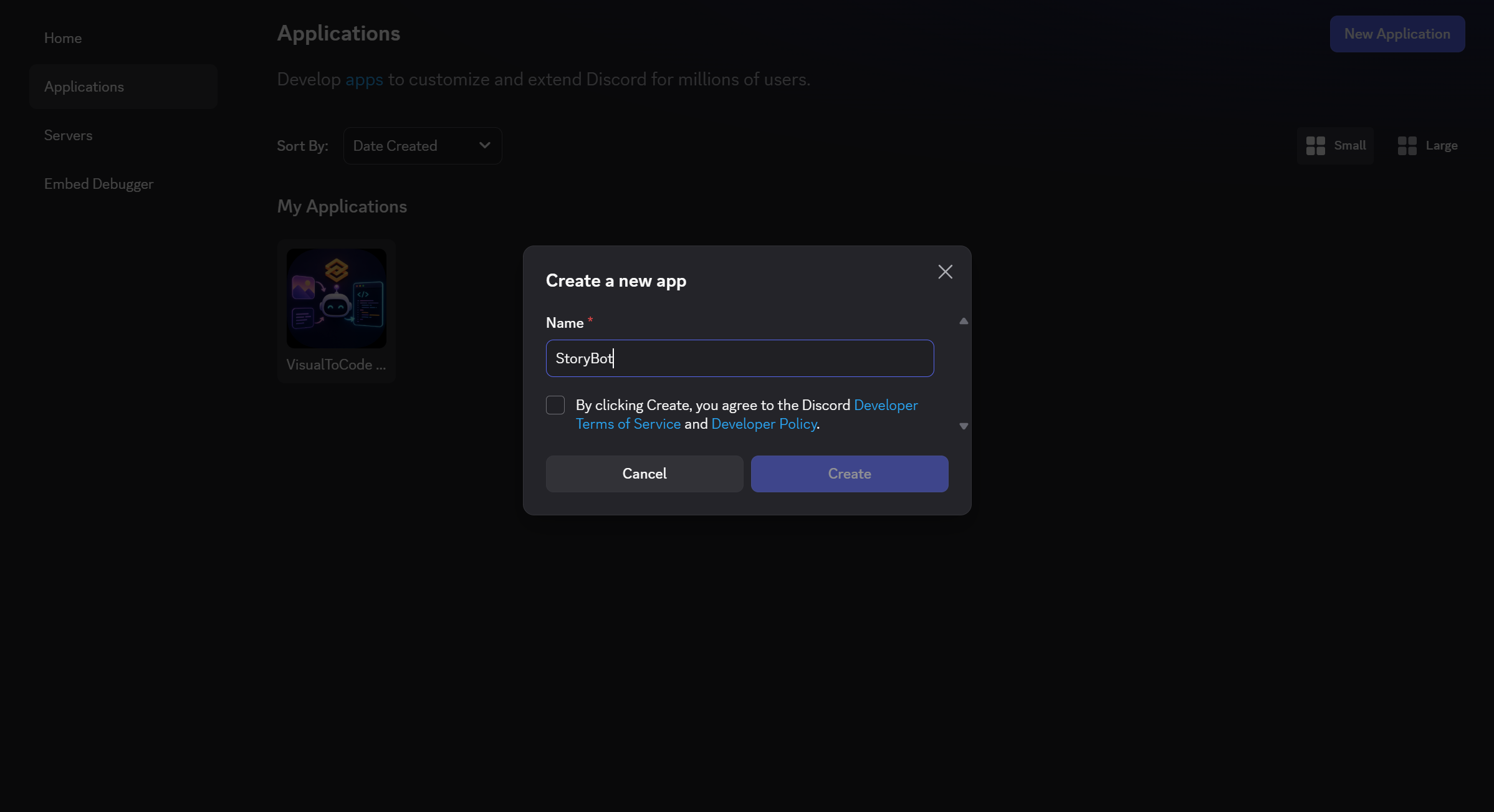
这个应用程序基本上就是你机器人的家。
Discord的开发者平台提供了创建和配置应用程序及机器人所需的工具。
创建应用程序后,打开其Bot部分并创建机器人用户。如果你愿意,可以添加自己的图标图片和自己的横幅。
然后进入Token部分,点击“Reset Token”来生成你的令牌。请将该令牌视为密码。切勿不要将其直接放入你的Python源代码中。

永远不要这样做:
bot.run("my-secret-token")
而且绝对不要把令牌上传到GitHub或提交到源代码控制中。相反,我们会将其存储在环境变量中,这将在后面讨论。
授予机器人读取消息的权限
我们的机器人需要查看包含命令的消息。
Discord使用一种叫做网关意图的机制来控制机器人接收哪些类型的事件。discord.py文档说明,意图必须在代码中启用,对于特权意图,还需要在Discord开发者门户中启用。
在开发者门户中,找到:
Bot
→ Privileged Gateway Intents
启用:
Message Content Intent
它应该看起来像这样:
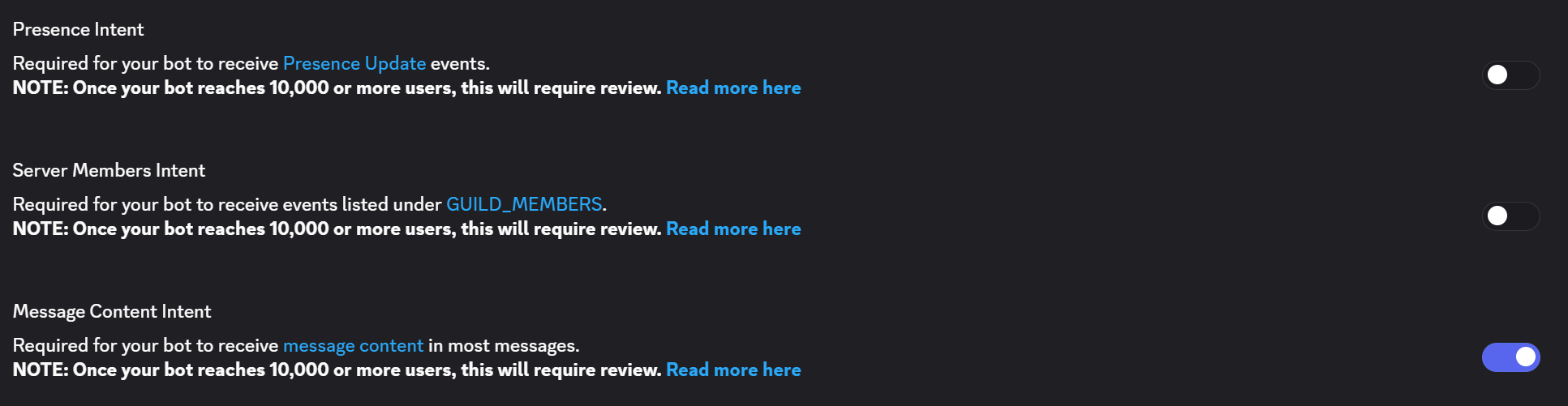
我们还会在Python中启用它,这一点我们将在本文后面讨论。
创建项目
创建一个文件夹:
discord-story-bot/
在里面,我们最终将会有:
discord-story-bot/
│
├── bot.py
├── requirements.txt
└── .env
三个重要的文件是:
bot.py:我们的 Python 程序requirements.txt:包含我们 bot 所需包名称的文本文件.env:我们在本地开发期间的秘密令牌
创建虚拟环境
在项目文件夹内打开终端。
运行:
python -m venv venv
然后激活它。
在Windows上:
venv\Scripts\activate
在 macOS/Linux 上:
source venv/bin/activate
虚拟环境为这个项目提供了自己的小型Python环境。
这意味着为这个机器人安装的软件包不会随意干扰另一个项目所使用的软件包。
安装discord.py
现在安装Discord库:
pip install -U discord.py
官方discord.py文档使用这种安装方法来设置库。
我们还将安装python-dotenv,它让读取本地.env文件变得更加容易:
pip install python-dotenv
然后保存依赖项:
pip freeze > requirements.txt
你的 requirements.txt 应包含项目所需的包。
创建你的第一个 Bot
让我们从小处开始。
打开 bot.py:
import os

import discord
from discord.ext import commands
from dotenv import load_dotenv


load_dotenv()

TOKEN = os.getenv("DISCORD_TOKEN")

intents = discord.Intents.default()
intents.message_content = True

bot = commands.Bot(
    command_prefix="!",
    intents=intents
)


@bot.event
async def on_ready():
    print(f"Logged in as {bot.user}")


@bot.command()
async def hello(ctx):
    await ctx.send("Hello! I'm online.")


bot.run(TOKEN)
这已经是一个功能正常的Discord机器人了。
让我们逐部分拆解它。
导入我们的库
首先:
import os
os 让Python与操作系统的各个部分进行通信。
我们将使用它来读取环境变量。
接下来:
import discord
这会导入discord.py。
然后:
from discord.ext import commands
commands 扩展让创建命令变得更加容易。
无需手动检查每条消息是否包含类似 !hello 的内容,我们可以这样写:
@bot.command()
async def hello(ctx):
    await ctx.send("Hello!")
discord.py命令系统是围绕装饰为命令的Python函数构建的。
最后:
from dotenv import load_dotenv
这让我们可以从.env文件中加载值。
加载令牌
我们的机器人需要一个令牌来将Python程序连接到Discord。将令牌视为一个密码,它允许我们的程序以机器人的身份进行身份验证。
我们不想将这个秘密直接放入Python代码中。相反,我们会将其存储在一个环境变量中。
首先,安装python-dotenv:
pip install python-dotenv
这个包让Python能够读取.env文件中的值。
现在创建一个名为.env的新文件,在与bot.py相同的文件夹中。
在.env中,添加:
DISCORD_TOKEN=YOUR_BOT_TOKEN_HERE
将YOUR_BOT_TOKEN_HERE替换为您从Discord开发者门户网站复制的令牌。
您的文件应该看起来像这样:
DISCORD_TOKEN=your_actual_token_here
不要与任何人分享此令牌,也不要将你的.env文件上传到GitHub。你的机器人令牌应像密码一样对待。
为了确保Git不会意外地将.env文件包含在仓库中,请在项目文件夹中创建一个名为.gitignore的文件,并添加:
.env
venv/
__pycache__/
现在让我们在 Python 中加载令牌。
在 bot.py 的顶部,添加:
import os
from dotenv import load_dotenv
然后添加:
load_dotenv()
这告诉Python查找.env文件并加载其中的变量。
现在我们可以获取Discord令牌:
TOKEN = os.getenv("DISCORD_TOKEN")
os.getenv() 查找名为 "DISCORD_TOKEN" 的环境变量并返回其值。
我们还可以检查是否确实找到了该令牌:
if not TOKEN:
    raise RuntimeError("DISCORD_TOKEN is not set.")
如果 Python 找不到令牌,程序会停止并给出清晰的错误消息,而不是稍后以令人困惑的方式失败。
理解意图
还记得我们之前讨论过如何在 Python 中启用消息内容可读性吗?我们现在要这样做。
添加:
intents = discord.Intents.default()
intents.message_content = True
第一行创建了一组Discord的默认意图(intents)。
第二行告诉Discord,我们的机器人需要访问消息内容的权限。
现在,我们创建机器人时需要将这些意图传递给它:
bot = commands.Bot(
    command_prefix="!",
    intents=intents
)
command_prefix="!" 意味着我们的机器人将识别以 ! 开头的命令。
例如:
!hello
The intents=intents part gives our bot the permissions we configured above.
这里有两个步骤,因为 Discord 需要知道我们的机器人被允许接收消息内容,同时我们的 Python 程序也需要告诉 Discord 它想要接收这些内容。
我们的基础设置现在应该如下所示:
import os
import discord

from dotenv import load_dotenv
from discord.ext import commands

load_dotenv()

TOKEN = os.getenv("DISCORD_TOKEN")

if not TOKEN:
    raise RuntimeError("DISCORD_TOKEN is not set.")

intents = discord.Intents.default()
intents.message_content = True

bot = commands.Bot(
    command_prefix="!",
    intents=intents
)
现在,我们的机器人已安全加载其令牌,并且discord.py知道在连接到Discord时需要请求哪些意图。
什么是ctx?
这部分在学习Discord机器人时可能看起来有点奇怪:
async def hello(ctx):
ctx是什么?ctx代表上下文(context)。它包含有关所用命令的信息。
例如,它可以告诉我们:
谁执行了该命令
它来自哪台服务器
它来自哪个频道
是哪条消息触发了它
接着:
await ctx.send("Hello!")
意思是:
“将这条消息发送回使用该命令的地方。”
为什么一切都写着async和await?
你可能会注意到:
async def hello(ctx):
以及:
await ctx.send(...)
Discord机器人花费大量时间等待。
它们等待:
消息
Discord响应
API请求
定时器
其他事件
Python的异步编程特性允许机器人等待这些操作,而不会冻结其他所有事情。
在构建你的第一个机器人之前,你不需要成为异步编程专家。
现在,把await想象成:
“暂停此任务直到该操作完成,同时让机器人处理其他事情。”
运行机器人
使用以下命令启动它:
python bot.py
如果一切正常,你的终端应该会打印出类似以下内容:
Logged in as StoryBot
现在前往你的Discord服务器并输入!hello。你的机器人应该会回复。
恭喜!你已经正式制作了一个Discord机器人。
现在,让我们把它变得更有趣。
构建故事叙述系统
首先,我们将创建一个交互式故事叙述命令。
在bot.py的顶部,添加:
import random
然后创建一些故事素材:
story_locations = [
    "an abandoned library",
    "a mysterious island",
    "a futuristic city",
    "a hidden underground laboratory",
    "a forest that never appears on maps"
]

story_items = [
    "a glowing key",
    "an ancient notebook",
    "a strange compass",
    "a locked metal box",
    "a mysterious photograph"
]

story_events = [
    "You hear footsteps behind you.",
    "The lights suddenly turn off.",
    "A hidden door opens nearby.",
    "Your phone starts displaying a message from an unknown sender.",
    "You notice that the room has changed."
]
现在创建命令:
@bot.command()
async def story(ctx):
    location = random.choice(story_locations)
    item = random.choice(story_items)
    event = random.choice(story_events)

    story_text = (
        f"You wake up in {location}.\n\n"
        f"Next to you is {item}.\n\n"
        f"{event}\n\n"
        "What do you do?"
    )

    await ctx.send(story_text)
现在 !story 可能会生成:
You wake up in a futuristic city.

Next to you is an ancient notebook.

A hidden door opens nearby.

What do you do?
再运行一次,你可能会得到完全不同的结果。
那是因为:
random.choice(...)
Python会从每个列表中随机选取一个项目。
这是一种简单的技术,但你的机器人瞬间就能生成数百种不同的组合。
让故事记住用户
随机故事很有趣,但当机器人能记住之前发生的事情时,互动故事会好得多。
我们可以创建一个字典:
user_stories = {}
字典将存储每个用户的故事信息。
例如:
user ID → current story
现在让我们修改故事命令:
@bot.command()
async def story(ctx):
    user_id = ctx.author.id

    location = random.choice(story_locations)
    item = random.choice(story_items)
    event = random.choice(story_events)

    user_stories[user_id] = {
        "location": location,
        "item": item,
        "event": event
    }

    await ctx.send(
        f"You wake up in {location}.\n\n"
        f"Next to you is {item}.\n\n"
        f"{event}\n\n"
        "What do you do?"
    )
现在每个用户都可以拥有自己活跃的故事。
添加故事选项
让我们给用户一些选择。
@bot.command()
async def choose(ctx, choice: str):
    user_id = ctx.author.id

    if user_id not in user_stories:
        await ctx.send("You don't have an active story. Try `!story` first.")
        return

    choice = choice.lower()

    if choice == "left":
        response = (
            "You head left and discover a room filled with old maps. "
            "One of them has your name written on it."
        )

    elif choice == "right":
        response = (
            "You head right and find a staircase leading toward "
            "a strange blue light."
        )

    else:
        response = "Try choosing `left` or `right`."

    await ctx.send(response)
现在用户可以输入:
!choose left
或者:
!choose right
注意这一点:
async def choose(ctx, choice: str):
choice 参数接收命令后面的文本。
因此:
!choose left
大约变为:
choice = "left"
这也是命令框架如此便捷的原因之一。命令框架是一套工具,可以让你在程序中更轻松地创建和管理命令。在我们的例子中,discord.py提供了命令框架,让我们可以使用@bot.command()等装饰器将Python函数转换为Discord命令。
与其手动检查每条消息来判断是否有人键入了!choose,discord.py会替我们处理这项工作。它能识别命令、获取用户的参数,并将它们传递给我们的函数。
所以当有人键入:
!choose left
discord.py 知道 choose 是命令,"left" 是参数,并且它应使用该信息调用我们的 choose() 函数。
添加一个闲聊命令
现在,我们来让机器人具备基本的对话能力。
我们可以将它连接到大型语言模型API,但学习聊天命令的工作原理实际上并不需要AI。我们将从一个简单的基于关键字的响应系统开始。
首先,我们创建一个包含一些关键字和可能响应的字典:
chat_responses = {
    "hello": [
        "Hey! What's up?",
        "Hello! How's your day going?",
        "Hi! What are you working on?"
    ],
    "python": [
        "Python is a great language for beginners because its syntax is pretty readable.",
        "If you're learning Python, try building something instead of only watching tutorials."
    ],
    "discord": [
        "Discord bots are a fun way to practice Python because you get instant feedback.",
        "Once you understand commands and events, you can build some surprisingly complex bots."
    ]
}

Think of `chat_responses` as a small collection of things our bot knows how to talk about. Each key, such as `"python"` or `"discord"`, represents a keyword the bot can look for. The value associated with each key is a list of possible responses.

We use a list instead of a single response so the bot doesn't give exactly the same answer every time. Later, we'll randomly choose one of these responses.

Now let's create the actual `!chat` command:

```python
@bot.command()
async def chat(ctx, *, message: str):
    text = message.lower()

    for keyword, responses in chat_responses.items():
        if keyword in text:
            await ctx.send(random.choice(responses))
            return

    await ctx.send(
        "I'm still learning how to respond to that. "
        "Try talking to me about Python or Discord!"
    )
这里发生了好几件事,让我们逐一分解。
首先是这一部分:
@bot.command()
async def chat(ctx, *, message: str):
将chat()函数转变为Discord命令。*很重要,因为它告诉discord.py将命令后的所有内容视为一个参数。
例如,如果有人输入:
!chat I want to learn Python
在!chat之后的整个短语将成为message的值:
message = "I want to learn Python"
接下来,我们有:
text = message.lower()
这会将消息转换为小写。这意味着Python、python和PYTHON都会变成python。如果没有这一步,我们的关键词检查可能会仅仅因为用户以不同方式将单词大写而漏掉匹配。
现在我们进入循环:
for keyword, responses in chat_responses.items():
.items() 让我们遍历关键词及其对应的响应列表。在每次循环中,keyword 包含类似 "python" 的内容,而 responses 包含与之关联的响应列表。
然后我们检查:
if keyword in text:
这询问当前关键词是否出现在用户消息的任何位置。
如果用户写:
!chat I want to learn Python
小写版本变为:
i want to learn python
由于"python"出现在该文本中,因此条件为真。
然后机器人可以选择一个随机响应:
await ctx.send(random.choice(responses))
random.choice() 从响应列表中随机选择一个项目,而 ctx.send() 则将该响应发送回 Discord 频道。
最后,我们有:
return
这会在找到匹配的关键词后停止函数的执行。如果没有它,即使机器人已经回复,循环也会继续检查其他关键词。
但如果没有关键词匹配会发生什么?
这正是这部分代码所处理的情况:
await ctx.send(
    "I'm still learning how to respond to that. "
    "Try talking to me about Python or Discord!"
)
如果循环结束而没有找到关键词,机器人将发送此回退消息。
例如:
!chat I like pizza
不包含 "hello"、"python" 或 "discord",所以机器人没有可供使用的特定响应。
这为我们提供了一种简单的方式,让机器人无需AI模型就能进行对话。
添加心理健康支持功能
现在来介绍一个需要更加谨慎处理的功能。
我们不会在内部将其称为"治疗命令",而是将其称为:
!support
开始之前快速附加一条免责声明……这只是一个有趣的健康脚本,不是真正的治疗师!
创建:
support_responses = {
    "stress": [
        "That sounds like a lot to handle. Try breaking the situation into one small task at a time.",
        "When everything feels overwhelming, it can help to pause and focus on what needs attention right now."
    ],

    "school": [
        "School can pile up quickly. Consider choosing one assignment to work on first instead of trying to solve everything at once.",
        "If school stress is getting difficult to manage, talking with a trusted person can make things feel less like something you have to handle alone."
    ],

    "sad": [
        "I'm sorry you're having a difficult moment. Taking a short break, doing something calming, or talking with someone you trust may help.",
        "You don't have to solve everything immediately. Give yourself some time and consider reaching out to someone you trust."
    ]
}
现在创建命令:
@bot.command()
async def support(ctx, *, message: str):
    text = message.lower()

    for keyword, responses in support_responses.items():
        if keyword in text:
            response = random.choice(responses)

            await ctx.send(
                f"{response}\n\n"
                "I'm a bot, not a therapist or medical professional. "
                "If you need personal support, consider talking with "
                "someone you trust."
            )
            return

    await ctx.send(
        "It sounds like something is bothering you. "
        "I can offer general wellness suggestions, but I'm not a therapist. "
        "If you need personal support, consider reaching out to someone you trust."
    )
现在,某人可以输入:
!support I'm stressed about school
机器人看到这个词:
school
并选择其中一个与学校相关的响应。
这是刻意简化的。
对于真实的公共机器人,在允许用户依赖它处理敏感情况之前,你需要更仔细的安全处理、测试、审核、隐私保护和升级逻辑。
添加帮助命令
一个好的机器人应该能够向用户说明自身。
@bot.command()
async def commands_help(ctx):
    await ctx.send(
        "**Available commands:**\n"
        "`!hello` - Say hello\n"
        "`!story` - Start a new story\n"
        "`!choose left` - Choose the left path\n"
        "`!choose right` - Choose the right path\n"
        "`!chat ` - Have a casual conversation\n"
        "`!support ` - Get general wellness support"
    )
有一个小问题。
Discord 的默认帮助命令已经叫做 help。
所以,不要使用:
async def help(ctx):
我们为自己的命名了:
commands_help
如果你希望命令本身被叫做 !help,你可以这样写:
@bot.command(name="help")
async def commands_help(ctx):
    ...
这就告诉Discord:
尽管Python函数有另一个名称,但请对这个函数使用
!help。
改进错误处理
机器人不应仅仅因为有人输入了无效命令就崩溃。
添加:
@bot.event
async def on_command_error(ctx, error):
    if isinstance(error, commands.MissingRequiredArgument):
        await ctx.send(
            "You're missing something. Try `!help` to see how the command works."
        )

    elif isinstance(error, commands.CommandNotFound):
        return

    else:
        print(f"Error: {error}")
现在,如果有人输入:
!chat
即使没有向机器人传递消息,它也可以提供有用的说明,而不是在对话中抛出令人困惑的错误。
整合所有内容
此时,你的 bot.py 可以是这样的:
import os
import random

import discord
from discord.ext import commands
from dotenv import load_dotenv


load_dotenv()

TOKEN = os.getenv("DISCORD_TOKEN")

if not TOKEN:
    raise RuntimeError("DISCORD_TOKEN is not set.")


intents = discord.Intents.default()
intents.message_content = True

bot = commands.Bot(
    command_prefix="!",
    intents=intents
)


story_locations = [
    "an abandoned library",
    "a mysterious island",
    "a futuristic city",
    "a hidden underground laboratory",
    "a forest that never appears on maps"
]

story_items = [
    "a glowing key",
    "an ancient notebook",
    "a strange compass",
    "a locked metal box",
    "a mysterious photograph"
]

story_events = [
    "You hear footsteps behind you.",
    "The lights suddenly turn off.",
    "A hidden door opens nearby.",
    "Your phone starts displaying a message from an unknown sender.",
    "You notice that the room has changed."
]


user_stories = {}


chat_responses = {
    "hello": [
        "Hey! What's up?",
        "Hello! How's your day going?",
        "Hi! What are you working on?"
    ],

    "python": [
        "Python is a great language for beginners because its syntax is pretty readable.",
        "If you're learning Python, try building something instead of only watching tutorials."
    ],

    "discord": [
        "Discord bots are a fun way to practice Python because you get instant feedback.",
        "Once you understand commands and events, you can build some surprisingly complex bots."
    ]
}


support_responses = {
    "stress": [
        "That sounds like a lot to handle. Try breaking the situation into one small task at a time.",
        "When everything feels overwhelming, it can help to pause and focus on what needs attention right now."
    ],

    "school": [
        "School can pile up quickly. Consider choosing one assignment to work on first instead of trying to solve everything at once.",
        "If school stress is getting difficult to manage, talking with a trusted person can make things feel less like something you have to handle alone."
    ],

    "sad": [
        "I'm sorry you're having a difficult moment. Taking a short break, doing something calming, or talking with someone you trust may help.",
        "You don't have to solve everything immediately. Give yourself some time and consider reaching out to someone you trust."
    ]
}


@bot.event
async def on_ready():
    print(f"Logged in as {bot.user}")


@bot.command()
async def hello(ctx):
    await ctx.send("Hello! I'm online.")


@bot.command()
async def story(ctx):
    user_id = ctx.author.id

    location = random.choice(story_locations)
    item = random.choice(story_items)
    event = random.choice(story_events)

    user_stories[user_id] = {
        "location": location,
        "item": item,
        "event": event
    }

    await ctx.send(
        f"You wake up in {location}.\n\n"
        f"Next to you is {item}.\n\n"
        f"{event}\n\n"
        "What do you do?"
    )


@bot.command()
async def choose(ctx, choice: str):
    user_id = ctx.author.id

    if user_id not in user_stories:
        await ctx.send(
            "You don't have an active story. Try `!story` first."
        )
        return

    choice = choice.lower()

    if choice == "left":
        response = (
            "You head left and discover a room filled with old maps. "
            "One of them has your name written on it."
        )

    elif choice == "right":
        response = (
            "You head right and find a staircase leading toward "
            "a strange blue light."
        )

    else:
        response = "Try choosing `left` or `right`."

    await ctx.send(response)


@bot.command()
async def chat(ctx, *, message: str):
    text = message.lower()

    for keyword, responses in chat_responses.items():
        if keyword in text:
            await ctx.send(random.choice(responses))
            return

    await ctx.send(
        "I'm still learning how to respond to that. "
        "Try talking to me about Python or Discord!"
    )


@bot.command()
async def support(ctx, *, message: str):
    text = message.lower()

    for keyword, responses in support_responses.items():
        if keyword in text:
            response = random.choice(responses)

            await ctx.send(
                f"{response}\n\n"
                "I'm a bot, not a therapist or medical professional. "
                "If you need personal support, consider talking with "
                "someone you trust."
            )
            return

    await ctx.send(
        "It sounds like something is bothering you. "
        "I can offer general wellness suggestions, but I'm not a therapist. "
        "If you need personal support, consider reaching out to someone you trust."
    )


@bot.command(name="help")
async def commands_help(ctx):
    await ctx.send(
        "**Available commands:**\n"
        "`!hello` - Say hello\n"
        "`!story` - Start a new story\n"
        "`!choose left` - Choose the left path\n"
        "`!choose right` - Choose the right path\n"
        "`!chat ` - Have a casual conversation\n"
        "`!support ` - Get general wellness support"
    )


@bot.event
async def on_command_error(ctx, error):
    if isinstance(error, commands.MissingRequiredArgument):
        await ctx.send(
            "You're missing something. Try `!help` to see how the command works."
        )

    elif isinstance(error, commands.CommandNotFound):
        return

    else:
        print(f"Error: {error}")


bot.run(TOKEN)
这足以创建一个功能出乎意料地强大的 Discord 初学者项目。
但这里有一个重要的限制。
我们的机器人实际上并不会记住任何东西
到目前为止,我们的机器人有一个小问题:它在关闭后实际上不会记住任何东西。
目前,我们将故事信息存储在 Python 字典中:
user_stories = {}
这在机器人运行时有效。但如果停止程序并重新启动,字典就会是空的。
为了解决这个问题,我们需要一个可以永久存储数据的地方。这就是数据库的用武之地。
对于这个项目,我们将使用SQLite。SQLite 是一种轻量级数据库,将信息存储在计算机上的一个文件中。Python 已经通过内置的 sqlite3 模块包含了 SQLite,因此我们不需要额外安装任何东西。
创建数据库
首先,在 bot.py 顶部附近添加这个导入语句:
import sqlite3
然后创建到数据库文件的连接:
db = sqlite3.connect("bot.db")
cursor = db.cursor()
第一行代码会创建一个名为bot.db的数据库文件(如果该文件尚不存在)。如果文件已存在,SQLite会直接打开它。
第二行创建了一个游标。你可以将游标视为Python程序中用于向数据库发送指令的部分。
现在我们需要创建一张表,用来存储用户的故事信息:
cursor.execute("""
    CREATE TABLE IF NOT EXISTS user_stories (
        user_id INTEGER PRIMARY KEY,
        location TEXT,
        item TEXT,
        event TEXT
    )
""")

db.commit()
让我们来分解一下。
cursor.execute() 告诉SQLite运行括号内的SQL命令。
SQL命令以以下内容开头:
CREATE TABLE IF NOT EXISTS user_stories
这告诉SQLite创建一个名为user_stories的表,但仅在该表不存在时才创建。
在括号内,我们定义每一行可以包含的信息:
user_id INTEGER PRIMARY KEY,
location TEXT,
item TEXT,
event TEXT
user_id 存储 Discord 用户的 ID。我们将其用作 PRIMARY KEY,这意味着每个用户都有自己唯一的一行。
location、item 和 event 都是关于用户当前故事的信息。
最后:
db.commit()
将更改保存到数据库中。
此时,你的项目文件夹中应该包含一个新文件,名为:
bot.db
你不需要手动打开或编辑这个文件。SQLite会为我们管理它。
保存用户的故事
现在让我们真正把信息存入数据库。
假设我们有这些变量:
user_id = ctx.author.id
location = "an abandoned castle"
item = "a mysterious key"
event = "a locked door"
我们可以使用以下方式保存它们:
cursor.execute(
    """
    INSERT OR REPLACE INTO user_stories
    (user_id, location, item, event)
    VALUES (?, ?, ?, ?)
    """,
    (user_id, location, item, event)
)

db.commit()
SQL语句告诉SQLite将信息插入到user_stories表中。
?符号是实际值的占位符。这些值在此单独提供:
(user_id, location, item, event)
这比手动将值直接插入SQL字符串更安全。
INSERT OR REPLACE 还意味着,如果该用户已保存了故事,他们的旧故事信息可以用新信息替换。
获取故事
保存信息只是工作的一半。我们还需要能够检索它。
我们可以这样在数据库中搜索用户的故事:
cursor.execute(
    """
    SELECT location, item, event
    FROM user_stories
    WHERE user_id = ?
    """,
    (user_id,)
)

story = cursor.fetchone()
这一次,我们使用SELECT来向SQLite查询信息。
WHERE部分非常重要:
WHERE user_id = ?
它告诉SQLite查找属于这个特定Discord用户的行。
接着:
story = cursor.fetchone()
获取第一个匹配的结果。
如果用户有已保存的故事,story 将包含他们的信息。如果没有,story 将为 None。
我们可以检查一下:
if story:
    location, item, event = story

    await ctx.send(
        f"You're currently in {location}. "
        f"You have {item}, and you're facing {event}."
    )
else:
    await ctx.send("I don't have a saved story for you yet!")
现在,即使Python程序重启之后,机器人也能检索之前保存的信息。
将其封装为命令
我们可以将此功能转换成一个简单的命令,让用户查看他们保存的故事:
@bot.command()
async def status(ctx):
    user_id = ctx.author.id

    cursor.execute(
        """
        SELECT location, item, event
        FROM user_stories
        WHERE user_id = ?
        """,
        (user_id,)
    )

    story = cursor.fetchone()

    if story:
        location, item, event = story

        await ctx.send(
            f"You're currently in {location}. "
            f"You have {item}, and you're facing {event}."
        )
    else:
        await ctx.send(
            "You don't have a saved story yet. "
            "Start one with `!story`!"
        )
现在用户可以输入:
!status
并且机器人可以从数据库中查找他们的故事。
这是我们最初使用的字典的一大改进。字典只会在Python程序运行时记住信息。SQLite让我们保存这些信息,以便机器人再次启动时这些信息仍然存在。
对于更大的机器人,你最终可以存储用户偏好、故事进度、物品清单、对话历史或其他数据。但就目前而言,这个简单的数据库足以让我们的机器人拥有真正的记忆。
添加真正的AI聊天
在将我们的机器人连接到AI模型之前,让我们快速了解一下Hugging Face。
如果你以前从未使用过它,Hugging Face是一个开发者可以查找、分享和使用机器学习模型和数据集的平台。可以把它看作一个庞大的AI工具社区和库。
Hugging Face还提供了一些工具,让Python程序无需从头构建和训练AI模型,即可与这些模型进行通信。
对于我们的机器人,我们将使用Hugging Face的Inference Providers将用户的消息发送到受支持的语言模型并接收其响应。
我们不会自己训练AI模型。相反,我们将使用现有的模型,并通过Python将其连接到我们的Discord机器人。
既然我们知道了Hugging Face是什么,让我们把它连接到我们的机器人。
安装Hugging Face库
首先,安装huggingface_hub:
pip install -U huggingface_hub
我们已经安装了python-dotenv,因此可以使用之前的.env文件,将Hugging Face令牌保存在源代码之外。
将你的Hugging Face令牌添加到.env文件中:
DISCORD_TOKEN=YOUR_BOT_TOKEN_HERE
HF_TOKEN=YOUR_HUGGING_FACE_TOKEN_HERE
将 YOUR_HUGGING_FACE_TOKEN_HERE 替换为你的实际 Hugging Face 访问令牌。
就像你的 Discord 机器人令牌一样,不要分享此令牌或将其上传到 GitHub。
创建 Hugging Face 客户端
现在在 bot.py 顶部附近添加此导入:
from huggingface_hub import InferenceClient
然后加载token:
HF_TOKEN = os.getenv("HF_TOKEN")

if not HF_TOKEN:
    raise RuntimeError("HF_TOKEN is not set.")
第一行从我们的环境变量中获取令牌。if 语句检查令牌是否确实存在。如果不存在,Python 会停止并给出有用的错误,而不是让程序稍后以令人困惑的方式失败。
现在创建 Hugging Face 客户端:
client = InferenceClient(
    api_key=HF_TOKEN
)
InferenceClient 是我们的Python程序用来与Hugging Face推理服务通信的工具。
将AI模型连接到机器人
现在,我们可以用一条将用户消息发送到语言模型的命令,替换掉之前基于关键词的!chat命令。
@bot.command()
async def chat(ctx, *, message: str):
    try:
        response = client.chat_completion(
            model="YOUR_SUPPORTED_MODEL_ID",
            messages=[
                {
                    "role": "system",
                    "content": (
                        "You are a friendly Discord bot. "
                        "Keep responses helpful, concise, and conversational."
                    )
                },
                {
                    "role": "user",
                    "content": message
                }
            ],
            max_tokens=200
        )

        answer = response.choices[0].message.content

        await ctx.send(answer)

    except Exception as error:
        print(f"AI error: {error}")
        await ctx.send(
            "I couldn't generate a response right now. "
            "Please try again later."
        )
这里发生的事情不少,让我们逐一梳理。
我们沿用之前已经使用过的相同命令结构开始:
@bot.command()
async def chat(ctx, *, message: str):
这将创建我们的!chat命令,并将用户在其后输入的所有内容存储在message中。
例如:
!chat What is Python?
我们得到:
message = "What is Python?"
接下来,我们使用:
try:
这告知Python,我们即将运行一段可能失败的代码。由于我们正在与外部服务进行通信,因此可能会遇到模型不可用、令牌无效或临时连接问题等情况。
现在,我们调用:
response = client.chat_completion(
这通过Hugging Face向模型发送一个聊天补全请求。messages参数包含我们希望模型响应的对话。
第一条消息具有角色"system":
{
    "role": "system",
    "content": (
        "You are a friendly Discord bot. "
        "Keep responses helpful, concise, and conversational."
    )
}
系统消息给模型提供关于它应该如何回应的指令。
然后我们提供用户的实际消息:
{
    "role": "user",
    "content": message
}
如果用户输入:
!chat What is Python?
然后 message 包含:
What is Python?
因此,模型将其作为用户的输入接收。
我们还有:
max_tokens=200
这限制了模型在一次响应中可以生成的文本量。保持响应相对较短在Discord中效果很好,因为在聊天频道中阅读大段文本并不总是很舒适。
你还需要替换:
model="YOUR_SUPPORTED_MODEL_ID"
使用你正在使用的Hugging Face推理提供者当前可用的模型ID。Hugging Face的文档显示,InferenceClient可以使用托管在Hugging Face Hub上的模型ID进行聊天补全。
请求完成后,我们需要从响应中获取实际文本:
answer = response.choices[0].message.content
响应包含有关模型输出的信息。 choices[0] 获取第一个生成的响应,而 .message.content 为我们提供实际文本。
然后我们将其发送到 Discord:
await ctx.send(answer)
所以整个过程看起来是这样的:
User types !chat
        ↓
Discord sends the command to our bot
        ↓
Python gets the user's message
        ↓
Hugging Face receives the message
        ↓
The AI model generates a response
        ↓
Python gets the generated text
        ↓
The bot sends it back to Discord
处理AI错误
我们命令的最后一部分是:
except Exception as error:
    print(f"AI error: {error}")
    await ctx.send(
        "I couldn't generate a response right now. "
        "Please try again later."
    )
如果 try 块内部出现问题,Python 会跳转到 except 块,而不是让整个机器人崩溃。
错误会打印在终端中,以便你可以调查发生了什么。
print(f"AI error: {error}")
与此同时,Discord用户会收到一条简单的消息:
I couldn't generate a response right now. Please try again later.
这比让API错误导致整个机器人崩溃要好得多。
此时,你已经拥有一个真正由AI驱动的!chat命令。你可以输入如下内容:
!chat Tell me an interesting fact about space.
而且模型可以生成回复,而不是从一小串预写消息中进行选择。
需要记住的一点是,这个机器人会将用户消息发送到外部AI服务。不要自动将私人或敏感对话发送给AI提供商。如果你让其他人使用这个机器人,请明确说明它处理哪些信息,并避免存储或发送超出机器人实际需要的数据。
你还可以将这个AI系统与之前的SQLite数据库结合使用。例如,你可以保存有限的对话历史,并在发送新消息时附上相关的先前消息。这样机器人就能在消息之间保留一些上下文,而不是将每条消息都当作一次全新的对话。
我们如何让机器人保持在线?
这里需要澄清一下“永远在线”这个说法。
有两种不同的情况。
选项1:在你的电脑上运行
当你运行:
python bot.py
当该程序运行时,机器人保持在线。
关闭终端?
机器人将离线。
关闭电脑?
机器人将离线。
断开网络?
机器人将离线。
这非常适合开发,但这不是7×24小时的生产环境设置。
选项2:将其托管在服务器上
对于需要在电脑关闭时保持在线状态的机器人,你需要一台在某处持续可用的计算机。
那台计算机可以是一台云服务器。
你上传项目、安装依赖、添加环境变量,然后启动:
python bot.py
现在,云机器代替你的笔记本电脑运行程序。
为持续运行的工作负载设计的服务可以用于此类应用。例如,Render 目前提供了一种 后台工作器 服务类型,适用于无需接收传入 Web 流量的持续运行进程。
但在部署前,你应该检查提供商当前的价格和服务限制。免费托管层级不一定是为始终在线的 Discord 机器人设计的,而且你也不应假设托管平台会提供“永久免费”的 24/7 运行环境。
“永远”的实际含义
这其实并没有真正神奇的:
ONLINE_FOREVER = True
设置。
只有当运行机器人的计算机或服务器持续运行时,机器人才能保持在线。
即使是专业托管的机器人也可能因以下原因离线:
服务器维护
部署
程序错误
网络问题
服务商中断
无效的凭据
API 变更
计费或帐户问题
因此,现实的目标是让机器人自动运行,并在出现问题时重启它。
这正是生产环境托管旨在帮助解决的问题。
如果你的服务提供商支持自动重启,请启用它们。
你还可以让 Python 代码在缺少重要环境变量时清晰地失败:
if not TOKEN:
    raise RuntimeError("DISCORD_TOKEN is not set.")
清晰的错误比一个神秘地上不了线的机器人更容易调试。
不要用随机技巧“让它保持唤醒”
你可能会找到一些教程,建议你部署一个Web服务器,并从另一个服务反复ping它,以防止免费托管实例休眠。
请谨慎对待这种方法。
托管提供商会更改他们的免费层规则,试图绕过这些限制可能会违反他们的条款。
如果你需要一个真正持久运行的机器人,请使用明确支持这种工作负载的托管选项。
例如,后台工作进程专为持续运行的进程而设计。这比试图让一个Web服务相信你的Discord机器人实际上是一个网站要干净得多。
附加功能与后续方向
现在你已经有了一个可运行的Discord机器人,接下来有很多项目方向可以选择。
你可以通过添加物品栏、多个章节、谜题或不同结局,将故事系统变成一个更完整的游戏。你也可以用Discord的斜杠命令和按钮替换基于文本的命令,让机器人更容易交互。
如果你对AI感兴趣,你可以通过给机器人不同的性格、添加严格限制的对话上下文,或使用AI生成部分故事来扩展聊天系统。
你还可以添加管理功能、每日故事提示,或适合你正在构建的Discord社区的其他命令。
这些是扩展项目的想法,而不是本教程中逐步构建的功能。重要的是,你现在已经具备了自行试验的基础。
从一个小功能开始,弄清楚它是如何工作的,然后在此基础上发展。你不需要一下子把机器人变成一个庞大的项目。
你对代码实验得越多,就越能看到Python、Discord、数据库和AI如何在真实应用中协同工作。
先在本地测试一切
在部署之前,请测试:
!hello
!story
!choose left
!choose right
!chat hello
!chat I want to learn Python
!support I'm stressed
!help
然后测试一些奇怪的输入:
!choose banana
!chat
!support
!unknowncommand
当您坐在电脑前时,您就希望能发现错误,而不是三天后当有人告诉您:
“您的机器人自周二起就出故障了。”
部署机器人
首先,确保您的项目包含:
discord-story-bot/
│
├── bot.py
├── requirements.txt
├── .gitignore
└── .python-version
一个.python-version文件可以包含类似这样的内容:
3.13
使用版本文件可以提升部署环境的可预测性。Render目前支持通过.python-version或环境变量指定Python版本。
您的requirements.txt应包含您的依赖项。
例如:
discord.py
python-dotenv
对于部署,你通常不需要本地的.env文件。
相反,添加:
DISCORD_TOKEN
作为您托管服务商控制面板中的环境变量。
这样密钥就不会存储在您的代码仓库中。
启动命令
您的部署服务需要知道要运行什么。
对于这个项目,启动命令是:
python bot.py
重要的是进程不会立即退出。
Discord 机器人之所以能保持运行,是因为 bot.run(TOKEN) 启动了 Discord 连接并让程序持续运行。
如果你的托管服务支持后台工作进程,那么对于这样的机器人来说是非常自然的选择,因为机器人不需要处理常规的 HTTP 请求。Render 特别将后台工作进程描述为持续运行且不接收传入网络流量的服务。
记住:保守你的秘密
这一点值得反复强调,因为很多初学者项目都是因此被攻破的。
永远不要提交这个:
bot.run("YOUR_REAL_TOKEN")
切勿上传:
.env
切勿将您的实际令牌粘贴到公开的 GitHub 问题中。
如果令牌意外公开,请将其视为已泄露并重新生成。
环境变量是您的好帮手。
你学到了什么
现在您已经构建了一个 Discord 机器人,它演示了几个真实的编程概念。
您学会了如何:
创建 Discord 应用程序
将 Python 连接到 Discord
使用
discord.py配置网关意图
创建命令
使用异步函数
读取命令参数
生成随机故事
存储临时用户状态
创建基本的聊天系统
创建心理健康支持功能
处理命令错误
将机密信息排除在源代码之外
为部署准备项目
考虑持久托管
而在所有这些功能之下,架构仍然出奇地简单:
User sends command
        ↓
Discord receives message
        ↓
discord.py receives event
        ↓
Python function runs
        ↓
Bot generates response
        ↓
Discord displays response
你不需要成千上万行的代码就能开始。
你只需要一个清晰的想法、几个Python概念,以及在问题不可避免地出现时愿意持续调试的心态。
结语
这个项目最酷的地方其实不在于Discord机器人本身,而在于这个项目教会你的东西。
一旦你理解了这些组成部分,你就可以在无数项目中复用同样的思路。
一个Discord机器人可以变成一个游戏,游戏可以变成一个Web应用,Web应用还可以变成一个更大的软件项目。
突然间,你不再只是学习Python语法了。你正在学习软件是如何真正构建出来的——一次一条命令。
祝编码愉快!